Is your Angular app server-rendered, or a client-only SPA?
<app-root> that JavaScript fills in, so crawlers see nothing on the first pass. Angular does have first-class server rendering — added with @angular/ssr — but it is opt-in, so most unconfigured apps come back client-rendered.Angular sits between the two extremes. Plain React never renders on the server; Next.js always does by default. Angular ships client-only out of the box like React, but unlike React it has an official, well-supported server-rendering path built into the framework. So the real question for an Angular app is not "is SSR possible" — it is "did anyone turn it on".
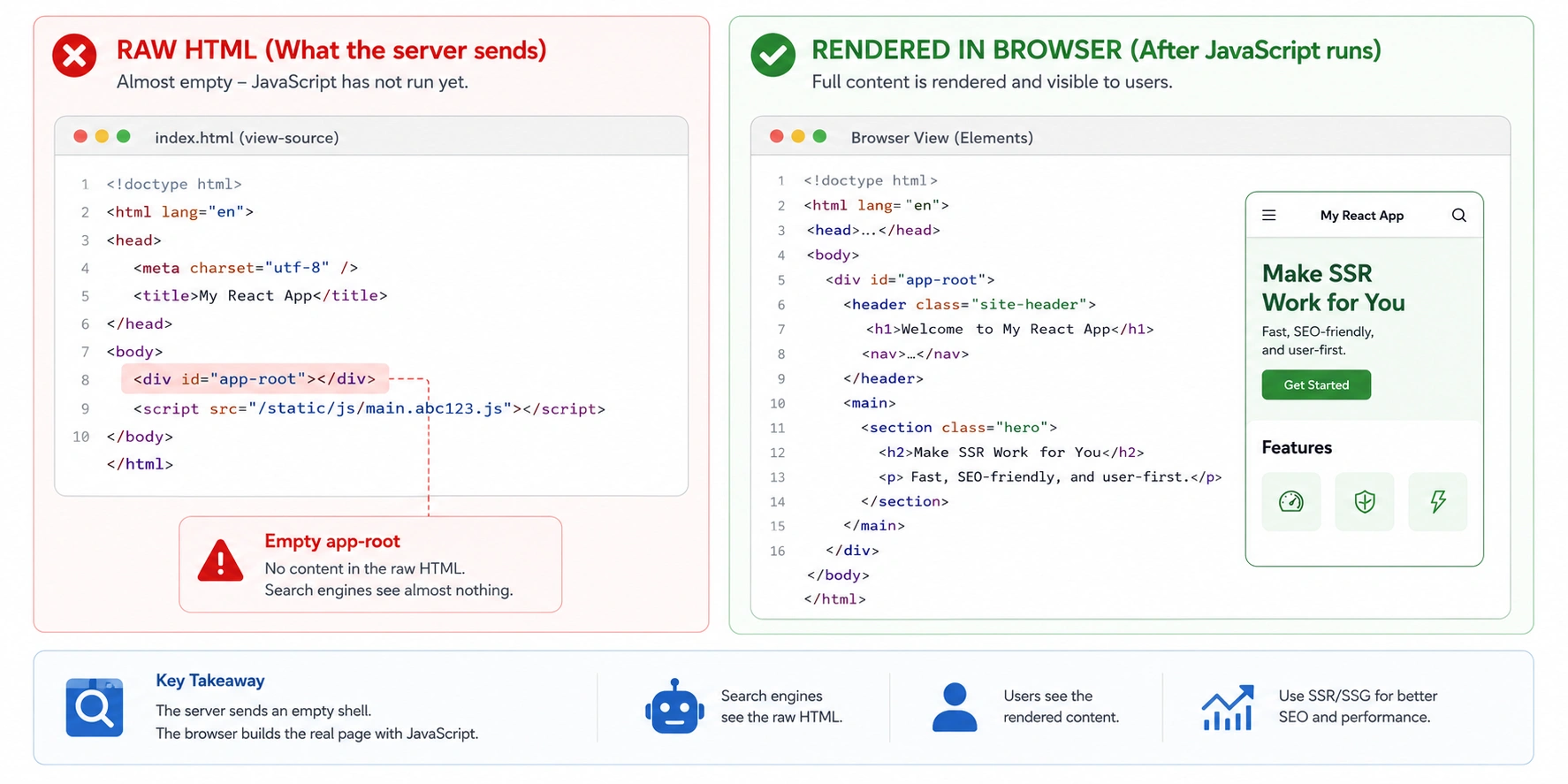
The empty app-root signature
A client-only Angular app has a distinctive fingerprint in the raw HTML. Stripped down, the body is essentially this:
That is the whole page to a crawler. The checker reports a content ratio near zero, few or no links, and the default title from index.html rather than the per-route title you set in code. The rendered screenshot shows your full application, which is why this is so hard to catch by eye — in a browser everything looks correct.
The tag name is Angular's tell. React leaves an empty <div id="root">; Angular leaves a custom <app-root> element (or whatever selector the root component declares). The signature is the emptiness either way.
Two-wave indexing is why it fails quietly
This is the mechanism specific to how search engines handle JavaScript-heavy Angular apps, and it explains why the failure is so easy to miss: nothing errors, pages just never show up.
Wave one is immediate. The crawler fetches the raw HTML and finds the empty <app-root> — one element and some script tags. No headings, no copy, no internal links to follow. There is nothing to index and, worse, nothing to tell the crawler this page is worth coming back for.
Wave two is the render queue. The URL is set aside for a headless browser to execute the JavaScript later — sometimes minutes, sometimes days, sometimes never for pages that looked empty the first time. On a large or frequently updated Angular app, that gap is where rankings quietly leak away. The tool shows you wave one directly: the raw fetch is exactly what the first pass receives.
The hash-routing trap
This one is unique to Angular among the common frameworks, and it silently destroys the indexability of an entire site regardless of rendering.
Angular can run its router in hash mode, producing URLs like site.com/#/about and site.com/#/products. To a user these are separate pages. To a crawler they are not: everything after the # is a fragment, and fragments are not distinct URLs. Every route on the site resolves to the same base URL — site.com/ — so the crawler sees one page where you have hundreds.
#/, you are in hash mode. The fix is switching to path-location strategy (real paths), which needs a server rewrite so deep links resolve — the same catch-all pattern SPAs use. Do this before worrying about SSR; a hash-routed site cannot be indexed per-page even if it renders perfectly.Angular's built-in server rendering
The good news that makes Angular different from plain React: server rendering is an official, first-class feature, not a third-party bolt-on. Modern Angular ships it under @angular/ssr (this is what used to be called Angular Universal in older projects).
Adding it — via ng new --ssr on a new project or ng add @angular/ssr on an existing one — makes each route prerender to complete HTML on the server, then hydrate in the browser. That is the state that returns a green verdict here. There is also incremental hydration in recent versions, which changes when interactivity attaches but not what the crawler receives: the HTML is still complete.
The subtlety once SSR is on: data fetched in ngOnInitwithout using Angular's transfer-state mechanism can still be fetched twice — once discarded on the server, once in the browser — and in some setups the server render finishes before the data arrives, leaving that content out of the HTML. That produces a HYBRID verdict on an app you believed was fully server-rendered.
Your setup and the verdict to expect
Find your configuration. A result that differs from the expectation is the thing to investigate.
Why an Angular page comes back CSR or HYBRID
In rough order of how often each turns out to be the cause:
Angular rendering FAQ
No. A default Angular application is client-rendered: it ships an empty app-root element and boots in the browser, so crawlers receive no content on the first pass. Angular has first-class server rendering under @angular/ssr, but it is opt-in and has to be added to the project.