JavaScript SEO: how rendering decides whether you get indexed
This is the whole of JavaScript SEO in one sentence, and almost every specific problem below is a variation of it. The rest of this guide is about recognising which variation you have and what to do about it.
It matters more now than it did five years ago, not less. Google has been rendering JavaScript since 2019 and does it well. But the crawlers that increasingly decide whether your content gets surfaced — the ones behind AI answers and chat assistants — largely do not render at all. A site that squeaked by on Google's patience is now invisible to a growing share of the traffic that matters.
How search engines actually crawl a page
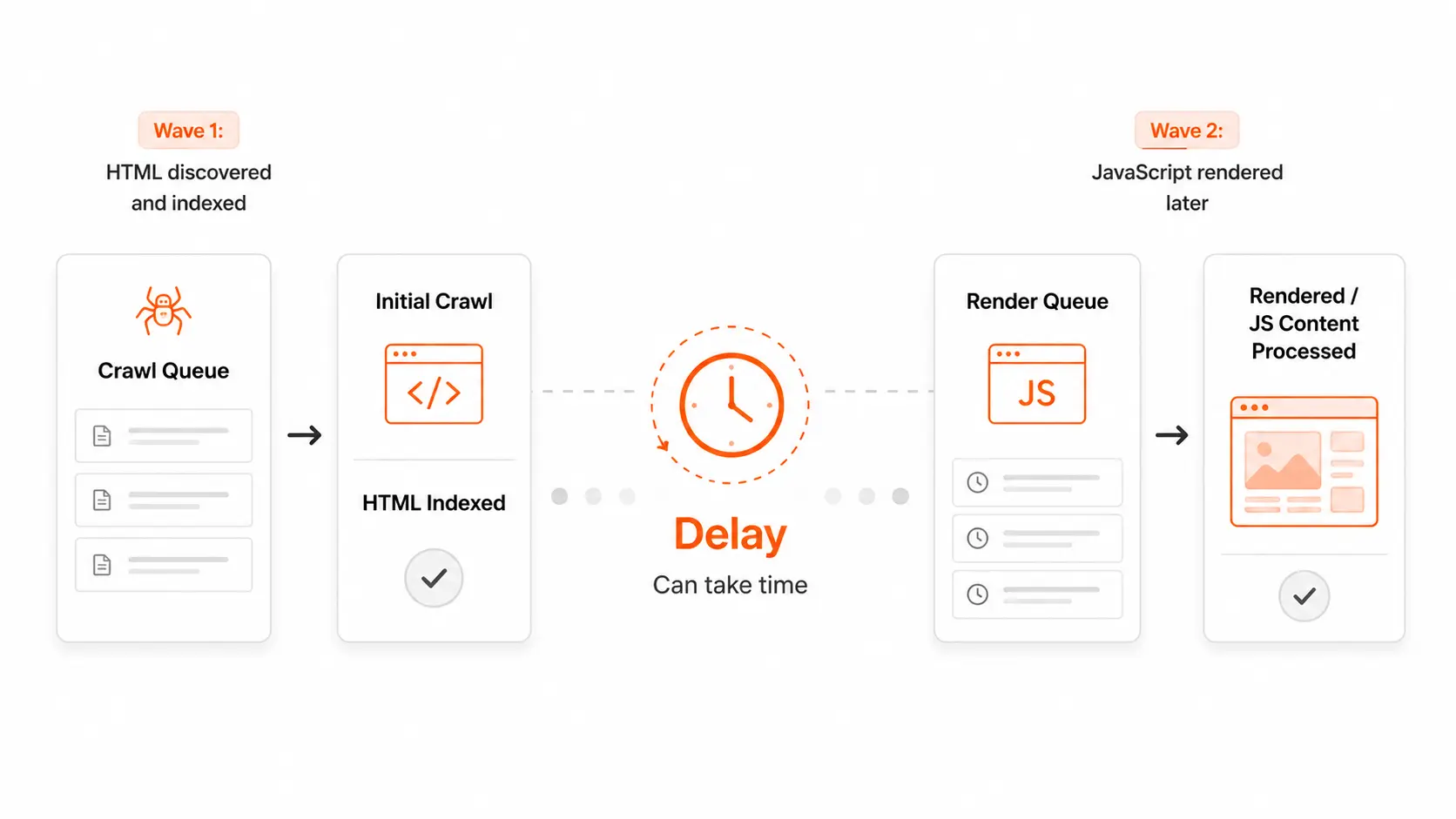
Indexing a JavaScript page happens in two separate passes, often days or weeks apart. Understanding the split explains nearly every symptom in this guide. If you want the mechanics in depth — the render queue, the timeouts, what decides your place in line — the dedicated guide on how Googlebot renders JavaScript covers only that.
The gap between the two passes is the entire problem. Rendering is expensive — a headless browser per URL, at the scale of the web — so it is rationed. Pages compete for it, and a page that looks empty and low-value on the first pass competes badly.
This is also why the failure is so confusing to diagnose. Your page eventually gets indexed, so nothing looks broken. It just took six weeks, and your competitor's server-rendered equivalent took two days. Multiply that across a catalogue of ten thousand URLs and the compounding difference is enormous.
The five rendering modes, and which are safe
Almost every framework offers several of these, often per route. The names differ but the underlying question is always the same: is the HTML complete when it leaves the server? If the CSR-versus-SSR distinction is the part you're shaky on, the SSR vs CSR guide is the one-page version.
The important and frequently missed point: SSR, SSG and ISR are equivalent for SEO. All three deliver complete HTML on the first request. Choosing between them is a question of data freshness and infrastructure cost, not of rankings — the SSR vs SSG vs ISR guide works through that tradeoff. If someone proposes migrating from static generation to server rendering for SEO reasons, that is not a rendering fix and it will make your pages slower to serve.
One term the table doesn't name because it isn't a rendering mode at all: hydration. That is the step where the browser attaches JavaScript to already-rendered HTML to make it interactive, and it has its own failure mode — a mismatch that can blank a page that looked perfect in the raw HTML. The hydration guide explains where it breaks.
Why JavaScript sites fail to index
So does JavaScript hurt SEO? Not in itself — plenty of JavaScript sites rank perfectly. It hurts when it moves content out of the first-pass HTML, and it does that through four distinct mechanisms, worth separating because they need different fixes.
The third one is the most damaging and the least discussed. Slow indexing is a delay; undiscovered URLs are a permanent hole in the site. If your category pagination or faceted navigation only renders client-side, the products behind it may as well not exist.
Symptoms, and what each one actually means
Rendering problems announce themselves indirectly. These are the complaints that turn out to be rendering, and what each usually indicates. Each links through to a guide that starts from that exact symptom.
If one of these is what brought you here, the fix guides are organised by symptom — pick the row that matches what you're seeing and start there.
How to diagnose it properly
Three methods, in ascending order of reliability. The first two are worth knowing mainly so you understand why they mislead people.
Disabling JavaScript in your browser is the classic advice and it is misleading. It shows you the page without JavaScript, but your browser has already applied cookies, cached assets and your session. It also does not tell you what a crawler would do differently. It catches only the most catastrophic cases.
Viewing sourceis better — that really is the raw HTML — but on a modern site it is tens of thousands of lines, and the question "is my content in here?" is genuinely hard to answer by scrolling. It also tells you nothing about how much is missing relative to the rendered page.
Fetching the page twice and comparing is the method that actually answers the question. Request the URL as raw HTTP with no JavaScript, then load the same URL in a real browser, then diff the two. The size of the gap is the answer, and the specific missing elements tell you where to look. That is what the tool below does.
Whatever you check, check the templates that generate revenue rather than the homepage. Homepages are usually the most carefully optimised page on a site while product, category and article templates use entirely different data-fetching patterns. A homepage passing tells you very little.
How to fix a rendering problem
Fixes in order of durability. The first is almost always the right answer; the others are compromises with specific tradeoffs.
That last option deserves a caveat, because the ground has shifted under it: Google deprecated its own dynamic-rendering recommendation and now treats it as a workaround rather than a blessed path. It still works, but it is no longer the advice — the dynamic rendering and prerendering guide covers when it's still reasonable and when it's a trap. And one thing that is not a fix at all: adding structured data describing content the crawler cannot see. Schema markup annotates content; it does not substitute for it. Marking up a product whose name and price only exist after hydration does not make the product visible — it just makes the markup inconsistent with the page.
AI crawlers are stricter than Google
This is the part that has changed most recently, and it moves the calculation for anyone who has been getting away with client rendering. The guide on AI crawlers and JavaScript goes further; the short version follows.
Google renders JavaScript. The crawlers behind AI assistants and answer engines largely do not — most fetch the raw HTML and work with what they find. A site that Google eventually indexes after a delay may be permanently invisible to them, because there is no second pass to wait for.
Practically, that means the tolerance for client-side rendering is narrowing. The argument "Google handles it fine" was always about one crawler being unusually capable and unusually patient. As more discovery happens through systems that read raw HTML and nothing else, first-pass completeness stops being a nice-to-have.
Five myths worth retiring
Where to go from here
Three ways in, depending on what you know. If you know your framework, the check pages cover the particular ways each one fails. If you have a specific symptom, the fix pages start from the symptom rather than the cause. If you want the concepts first, the rest of the guides go deeper on each piece.
Or, if you'd rather not own this yourself, the rendering audit and implementation service is for teams who want it diagnosed and fixed for them.
JavaScript SEO FAQ
Yes. Google executes JavaScript and indexes the resulting content. However it does so in a second pass that happens some time after the initial crawl, and that pass is rationed based on how valuable the page appears. Content that only exists after JavaScript runs is therefore indexed more slowly and less reliably than content present in the initial HTML.