Is your Shopify store rendering content? (Liquid themes: yes)
Shopify is a hosted commerce platform, not a JavaScript framework, so the core of your store is server-rendered whether you think about it or not. Liquid runs on Shopify's servers. That makes the Shopify diagnosis distinctive: the theme itself is almost always fine, and the content that slips out of the HTML tends to be the stuff apps add — which is often exactly the content (reviews, rich descriptions) you want indexed.
Why Liquid themes are safe by default
Liquid is Shopify's server-side templating language. When a request comes in, Shopify runs the theme's Liquid templates on its own infrastructure, pulls the product, collection or page data, and returns finished HTML. Product name, description, price, variants and your theme copy are all in that HTML. There is no client-side rendering step in a standard theme — the browser receives a complete page.
So a normal Shopify product or collection page returns a high content ratio with metadata present in this check. If your store is a stock or lightly customised Liquid theme with your product content written in the Shopify admin, the theme layer is not your problem. Look at what apps have added.
App-injected content is the real Shopify issue
This is the Shopify-specific failure, and it is extremely common. Shopify apps extend your store by injecting content into the page with JavaScript after it loads. Product-review apps like Judge.me, Loox and Yotpo add star ratings, review text and Q&A. Upsell, bundle and recommendation apps add cross-sell copy. Size-chart, wishlist and social-proof apps add their own blocks. All of this typically arrives after the initial HTML, injected client-side.
Hydrogen and headless storefronts
Shopify has its own framework for custom storefronts, Hydrogen, built on React and typically hosted on Oxygen. The good news: Hydrogen server-renders by default — it is built around React Server Components, so a conventionally built Hydrogen store delivers content in the HTML and reads green in this check.
The case to watch is a customheadless storefront that is not Hydrogen — a plain React or single-page app that pulls product data from Shopify's Storefront API in the browser. That is an ordinary client-side rendering problem wearing a Shopify backend: the storefront hands crawlers an empty shell and fetches everything after load. Run this checker against the live storefront URL, and if it is a client-rendered React app, the React page describes the fix.
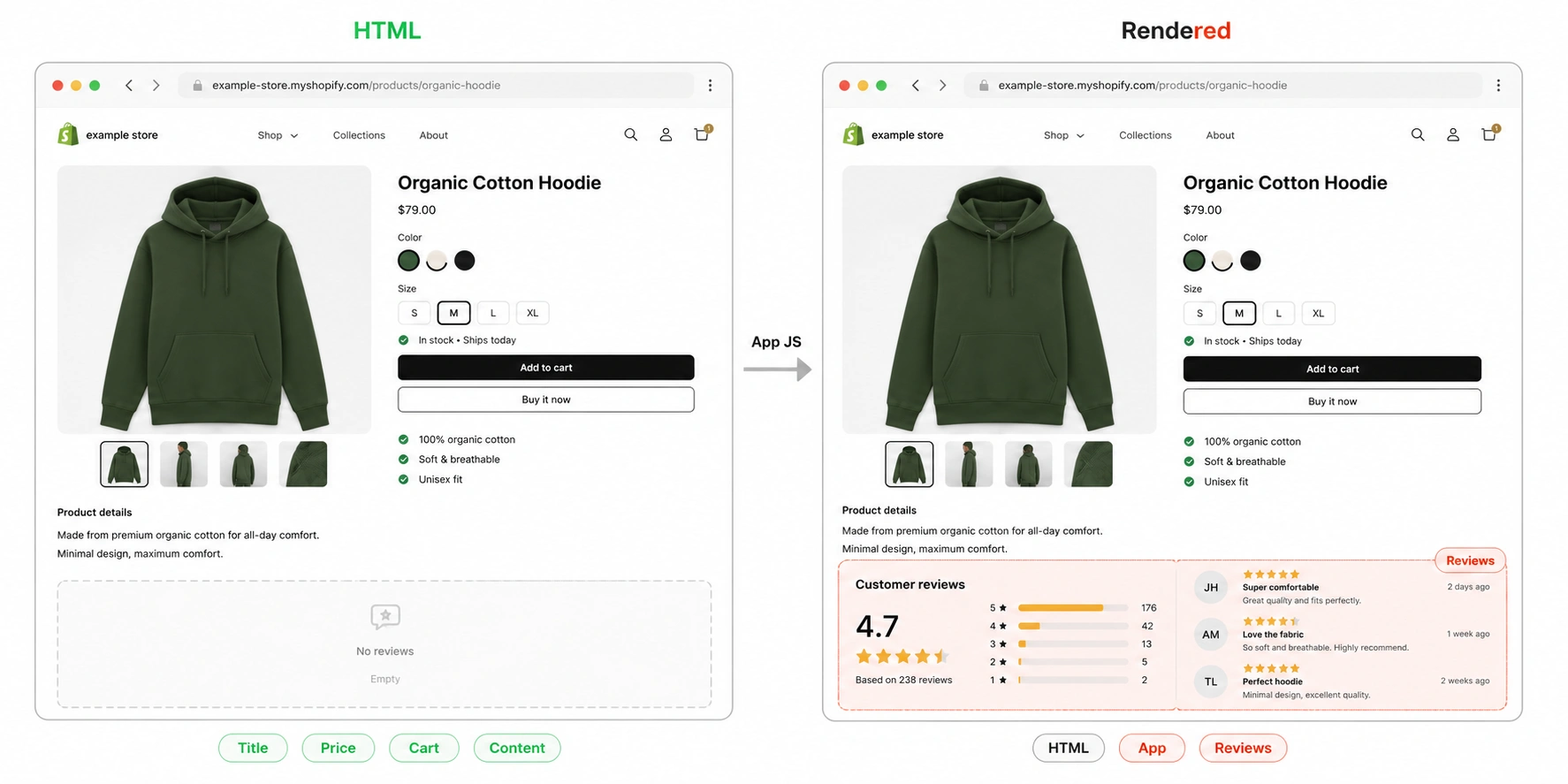
AJAX sections and infinite scroll
A couple of theme-level patterns can also move content out of the HTML. Online Store 2.0 themes can load sections — recommended products, related items, sometimes reviews — through Shopify's Section Rendering API after first paint, so those sections are not in the initial response. And infinite-scroll collection pages load only the first batch of products server-side, fetching the rest with JavaScript as you scroll, which leaves deep collection content uncrawled. For collections that matter, use real paginated URLs so every product sits on a crawlable page.
Your configuration and the verdict to expect
Find your setup. On Shopify, an amber result almost always means an app or a section is injecting content client-side; a red result usually means a custom client-rendered headless build.
When Shopify actually breaks
Shopify rendering FAQ
Standard Shopify themes are. They are built in Liquid, Shopify's server-side templating language, which Shopify renders on its own servers before sending the page. Product titles, descriptions, prices and theme content are in the HTML without any client-side rendering. The exceptions are custom headless storefronts and content that apps inject with JavaScript after load.