Is your SvelteKit page actually server-rendered?
export const ssr = false is set, when the app is built as a static SPA with a fallback, or when the main content is fetched in onMount instead of a load function. The default is the good case.SvelteKit sits alongside Next.js and Nuxt as an SSR-by-default meta-framework, so the diagnosis is the same shape: the page is rarely empty, it is a server-rendered page with the important part missing. What differs is the machinery — SvelteKit's load functions and page options are its own model and worth understanding directly.
Compiled does not mean server-rendered
Svelte's identity is that it is a compiler — it turns components into small, efficient JavaScript at build time, with no virtual DOM. This is a real performance advantage, and it is completely irrelevant to whether your content is in the HTML.
Compilation happens at build time and produces JavaScript; server rendering happens at request or build time and produces HTML. A brilliantly compiled Svelte component still renders to nothing in the raw HTML if server rendering is turned off. If someone assumes their SvelteKit site must be crawlable because Svelte "compiles away the framework", that assumption is the bug. Compilation and rendering are separate concerns.
The load function split
SvelteKit fetches data through load functions, and there are two kinds. The distinction is the single most useful thing to understand about SvelteKit rendering.
Its load runs only on the server. Ideal for database queries and secrets. The data is resolved before the HTML is sent.
Its load runs on the server for the first render, then in the browser on client-side navigation. The first render still puts data in the HTML.
Both are fine for SEO, because both run on the server for the initial request. The point of the split is where the code is allowed to run and what it can access — not whether the crawler sees the result. Data loaded through either one ends up in the server HTML. The problem is data loaded through neither, which is the onMount case below.
The ssr, csr and prerender page options
SvelteKit exposes rendering as three options you export from a +page.js or +layout.js. Setting them on a layout cascades to everything beneath it, which is how a single line can change an entire section — or the entire site, from the root layout.
The one that breaks crawlability is export const ssr = false. It disables server rendering for that route — or, in the root layout, for the whole app — leaving an empty shell in the HTML exactly like a client-only SPA. As with Nuxt's ssr: false, this is sometimes a deliberate choice for an app behind a login and sometimes inherited and forgotten. If a whole SvelteKit site comes back CSR, look for this in the root +layout.js first.
Note that csr = falseis the opposite situation and harmless for SEO: it ships the server-rendered HTML with no client JavaScript, much like Astro's default. It is ssr = false that removes your content from the HTML.
The onMount trap
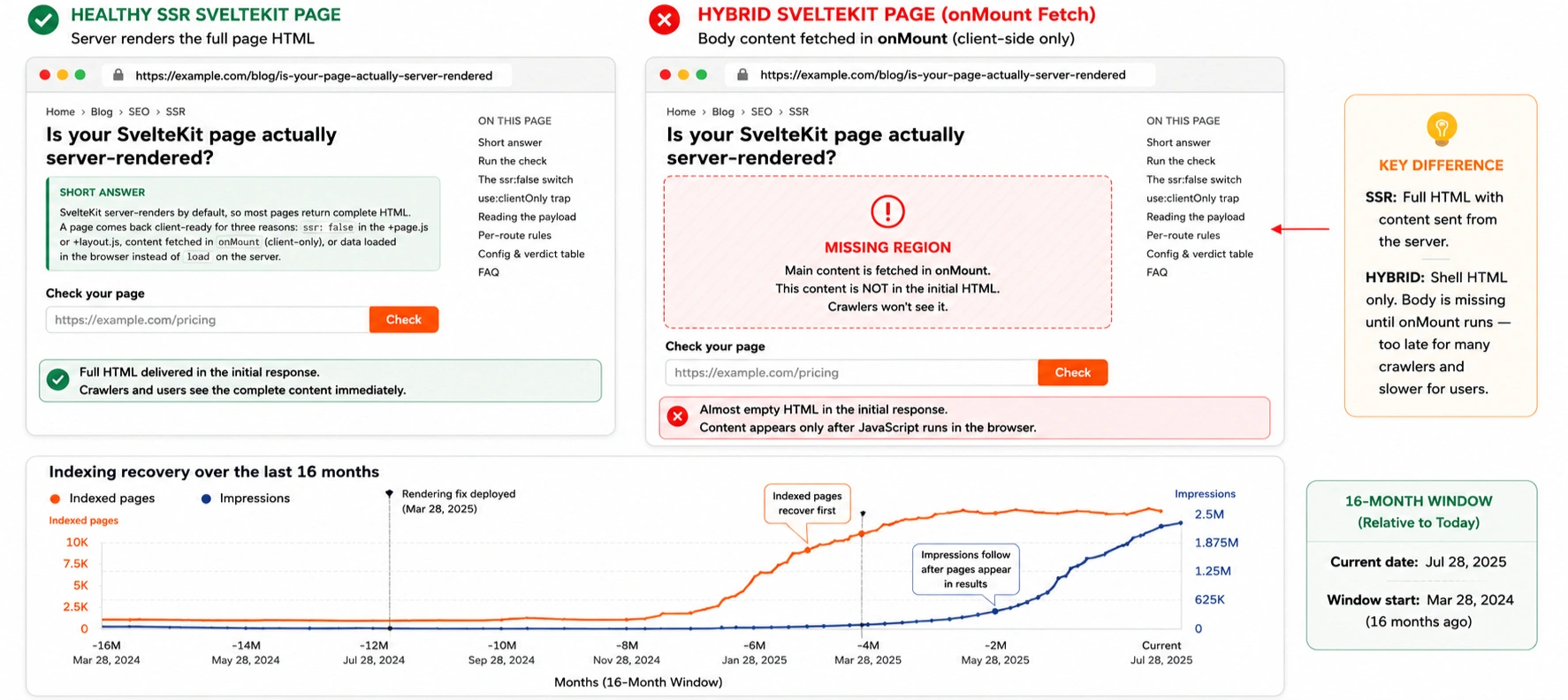
The subtle cause, and the SvelteKit equivalent of fetching in a React useEffect. onMount runs only in the browser, after the component has mounted — which is after the server has already sent the HTML. Anything you fetch there is absent from the server response.
If your article body or product data is loaded in onMount rather than in a load function, the page shell renders server-side and looks healthy while the content that matters arrives only after hydration — a HYBRID verdict. Moving that fetch into a load function is usually the whole fix, and it is a small change because the data ends up on the same data prop either way.
adapter-static and SPA mode
SvelteKit can be built as a fully static site or as a single-page app, depending on the adapter and its configuration. Full prerendering is great for crawlers — every route becomes static HTML. But adapter-static configured with a SPA fallback (a fallback: 'index.html' option) is a different thing: it serves the same shell for every URL and lets the client router take over, which reintroduces the exact problem plain React SPAs have.
Your configuration and the verdict to expect
Find your setup. If the tool returns something other than the expected verdict, that difference is the bug.
SvelteKit rendering FAQ
Yes. SvelteKit server-renders every route to complete HTML unless you disable it. This is different from plain Svelte, which is only a compiler and has no rendering model of its own. A SvelteKit route usually comes back client-rendered only when ssr is set to false, when it is built as a SPA, or when content is fetched in onMount.