Is your Nuxt page actually server-rendered?
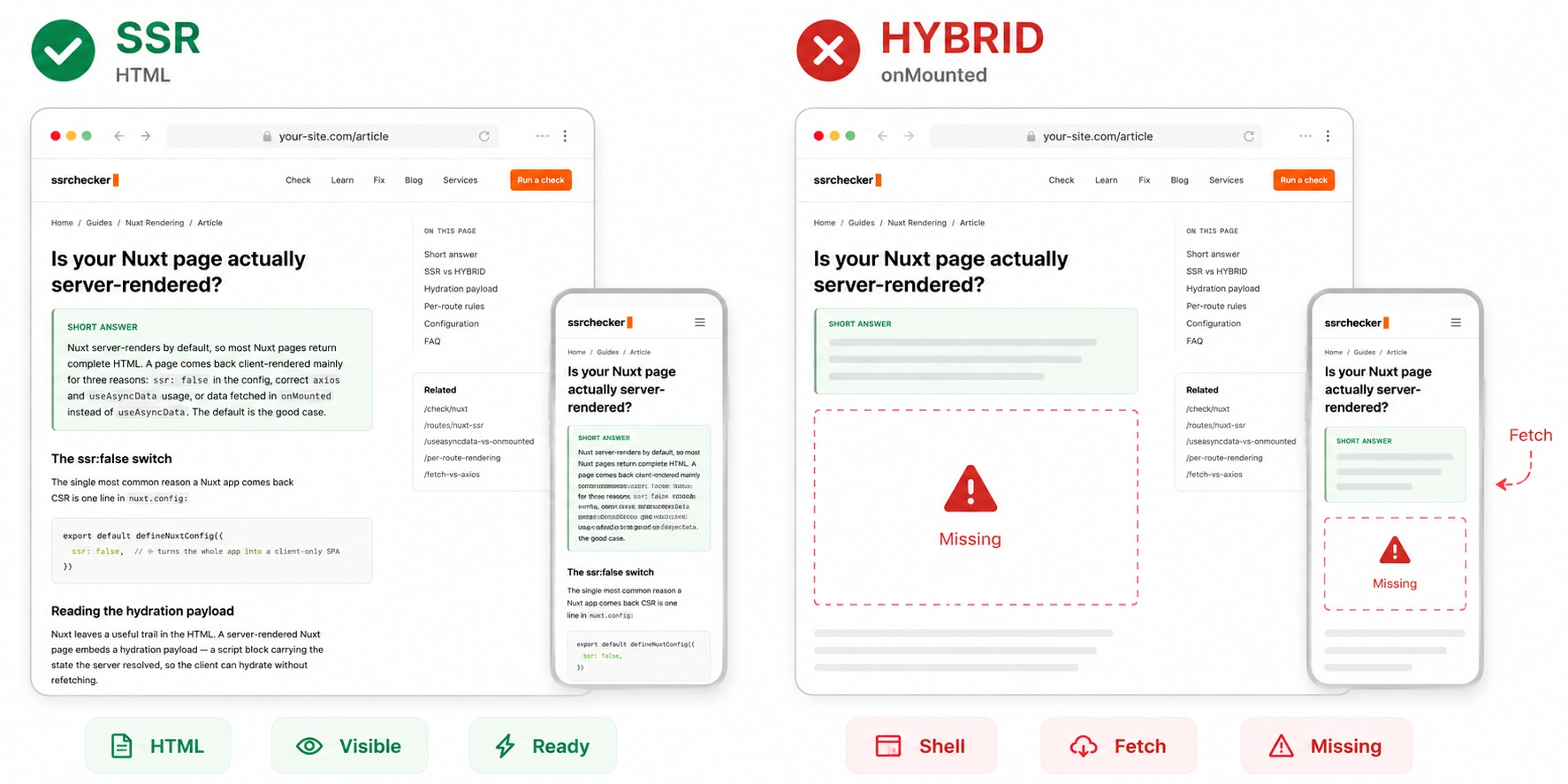
ssr: false in the config, content wrapped in <ClientOnly>, or data fetched in onMounted instead of useAsyncData. The default is the good case.Nuxt is the inverse of plain Vue. A bare Vue app is client-only and the question is whether you have server rendering at all; Nuxt gives you server rendering by default, so the question becomes which specific choice turned it off for a given page. That makes the Nuxt diagnosis subtler — the page is rarely empty, it is a server-rendered page with the important part missing, which reads HYBRID.
The ssr:false switch turns off everything
The single most common reason a Nuxt app comes back CSR is one line in nuxt.config:
With ssr: false, Nuxt behaves exactly like a default Vue SPA: the server sends an empty shell and everything renders in the browser. This is sometimes set deliberately — for an internal dashboard behind a login, it is a reasonable choice — but it is also set by accident, or inherited from a starter template, and then forgotten. If your whole site comes back CSR, check this line first.
The <ClientOnly> trap
Nuxt provides a <ClientOnly> component that renders its children only in the browser, skipping them during server rendering. It exists for good reasons — wrapping a component that touches window, or a third-party widget that breaks under SSR.
The trap is wrapping too much. If your main content — an article body, a product grid, a listing — sits inside <ClientOnly>, it is deliberately excluded from the server HTML, so crawlers never see it. The rest of the page renders server-side and looks healthy, which produces a HYBRID verdict that is easy to wave away. Anything a crawler needs to read must live outside <ClientOnly>.
useAsyncData and useFetch vs fetching in onMounted
This is the most frequent subtle cause, and the fix is usually a small refactor rather than an architectural change.
useAsyncData and useFetch run on the server and block the render until the data resolves, so the content is in the HTML the crawler receives.
A bare $fetch in a component, or a fetch inside onMounted, runs only in the browser after hydration. The content is absent from the server HTML.
The two look almost identical in a component, which is why this slips through. Both fill the page correctly in a browser. Only the first puts the data in the server response. Moving a client-side fetch into useAsyncData is often the entire fix for a HYBRID Nuxt page.
Reading the hydration payload
Nuxt leaves a useful tell in the HTML. A server-rendered Nuxt page embeds a hydration payload — a script block carrying the state the server resolved, so the client can hydrate without refetching. Its presence is a positive signal that the page was rendered on the server.
What matters for diagnosis is the relationship between that payload and the visible HTML. If the payload is present and the content is in the HTML, the page is genuinely server-rendered. If the shell is there but your main content is missing from both the HTML and the payload, that content is being fetched client-side — which points straight back to the onMounted pattern above. The checker compares raw and rendered output so this gap is visible without reading the payload by hand.
Per-route rendering rules
Nuxt can apply different rendering strategies per route through route rules, which means one deployment can legitimately return different verdicts on different URLs. A marketing route might be prerendered, a dashboard route might be ssr: false, and a frequently-updated route might use stale-while-revalidate caching.
This is by design, not a bug — but it means you should check the templates that need to rank individually rather than assuming the whole site shares one mode. A green homepage tells you nothing about a product route governed by a different rule.
Your configuration and the verdict to expect
Find your setup. If the tool returns something other than the expected verdict, that difference is the bug.
Nuxt rendering FAQ
Yes. A default Nuxt application server-renders every page to complete HTML unless you change that. This is the opposite of plain Vue, which is client-only by default. A Nuxt page usually comes back client-rendered only when ssr is set to false, content is wrapped in ClientOnly, or data is fetched client-side after hydration.