Is your Vue app server-rendered, or a client-only SPA?
<div id="app"> that JavaScript fills in, so crawlers see nothing on the first pass. The realistic way to server-render a Vue app is Nuxt, Vue's meta-framework — plain Vue has no built-in SSR for a full site.Vue behaves much like React here: the library renders in the browser, and server rendering comes from a framework built on top of it. For React that framework is Next.js; for Vue it is Nuxt. So the practical question on this page is whether your Vue app is a plain client-only SPA — and if it is, whether you should move to Nuxt.
The empty #app signature
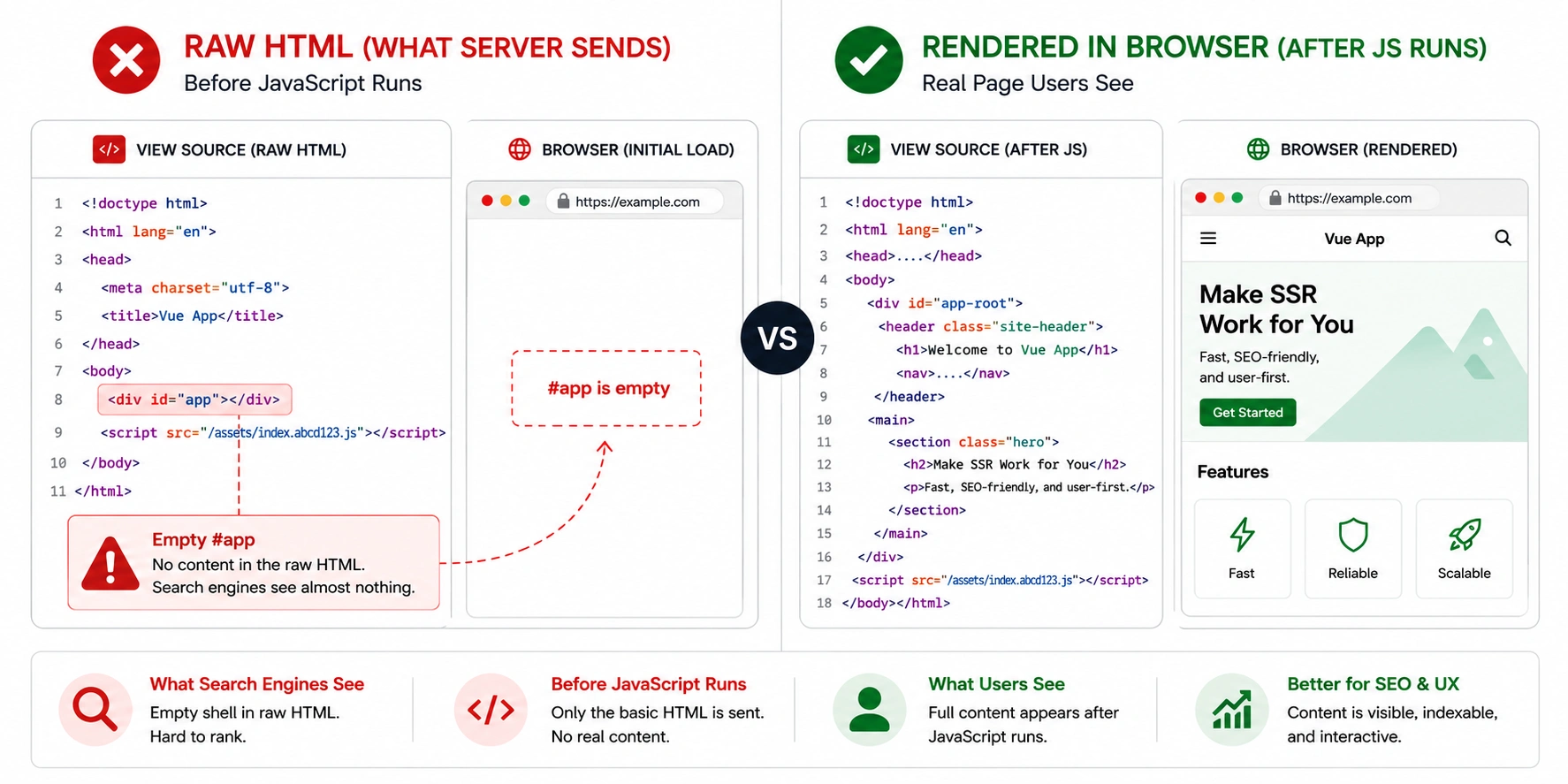
A client-only Vue app has a recognisable fingerprint in the raw HTML. Reduced to essentials:
That is the whole page to a crawler. The checker reports a content ratio near zero, few or no links, and usually a placeholder title. The rendered screenshot shows your complete site, which is exactly why this is hard to catch by looking — the browser fills everything in.
The mount element is Vue's tell. React leaves <div id="root">, Angular leaves <app-root>, Vue conventionally leaves <div id="app"> — though the id is configurable. The signature is the emptiness, not the exact id.
Options API vs Composition API does not matter here
Worth killing a common misconception before it wastes anyone's time. Whether you write components with the Options API or the Composition API has no effect on rendering. Both run in the same place at the same time. Neither puts content in the initial HTML on a client-only app, and neither prevents it on an SSR app.
If someone suggests rewriting components from one API to the other to fix indexing, that is not a rendering fix and will change nothing the crawler sees. The rendering mode is decided by whether there is a server rendering the components at all — not by how the components are authored.
vue-router: history mode vs hash mode
Like Angular, Vue's router can run in hash mode, and it carries the same penalty. In hash mode your URLs look like site.com/#/about. Everything after the # is a fragment, and crawlers treat fragments as part of the same base URL — so every route on the site collapses into one indexable page.
#/, you are in hash mode. History mode (real paths) is the SEO-friendly choice, but it needs a server rewrite so that deep links resolve to index.html instead of 404ing. Fix this regardless of rendering — a hash-routed site cannot index per-page even when it renders correctly.The dynamic title trap
A failure worth checking even when body content passes. If Google shows a title that is not the one you set, the title is probably being written after the app boots.
Head-management libraries in the Vue ecosystem — @unhead/vue, useHead, or the older vue-meta — set the document title and meta tags from within your components. On a client-only app that happens when Vue runs, which is after the crawler has already captured the initial HTML. The tags are correct in the browser and absent from the raw response. The checker reports title, description and canonical separately from body content so you can see this directly.
When the answer is Nuxt
If your Vue app needs to rank and this check comes back CSR, the durable fix is usually Nuxt rather than hand-rolling server rendering. Nuxt is to Vue what Next.js is to React: it provides server rendering, file-based routing, static generation and head management as first-class features, and it server-renders by default.
Vue does expose its own renderToStringfor building SSR by hand, but very few teams maintain that themselves — the realistic path is the framework. If you are already on Nuxt and still seeing a CSR or HYBRID verdict, the cause is different and specific to Nuxt's data-fetching model. That has its own page.
Your setup and the verdict to expect
Find your configuration. A result that differs from the expectation is worth investigating.
Vue rendering FAQ
No. Vue is a client-side framework, and a default create-vue or Vite project produces an empty div with id app that JavaScript fills in after loading. Crawlers receive no content on the first pass. Server rendering for a full Vue app realistically comes from Nuxt, Vue's meta-framework, rather than from Vue itself.